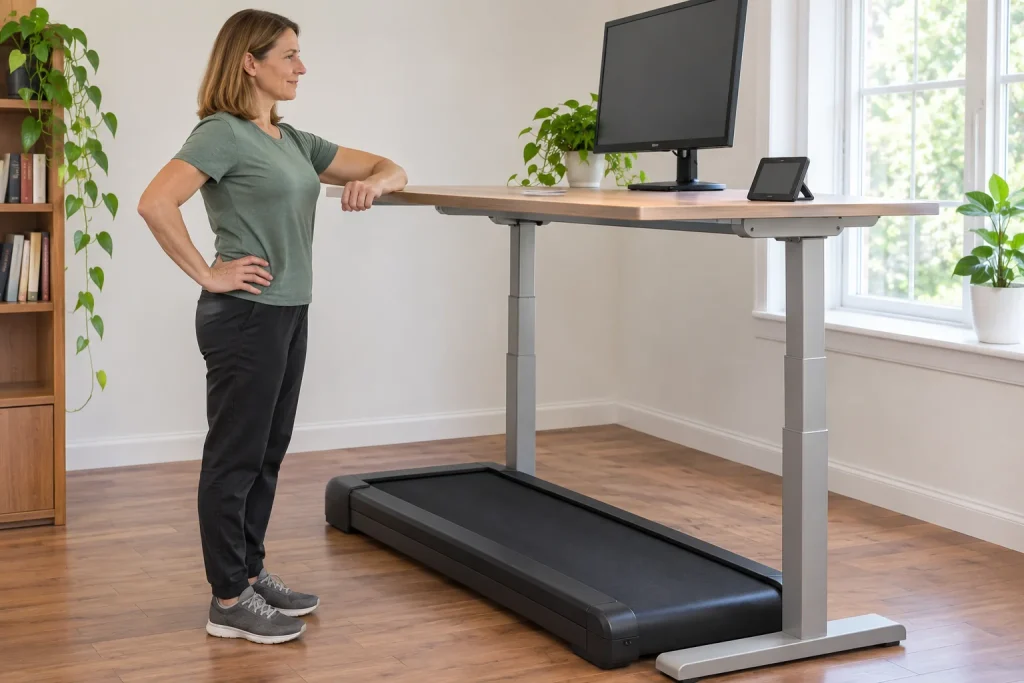
The LifeSpan TR1200 Pro paired with the SC130 console is more interesting as part of a workstation than as something folded and hidden daily. The base stays under the desk, the small console on the desktop, and data may reach your phone through a supported connection. This sounds simple, but contains three decisions: does the base fit the room, can you operate it beside the desk and does your intended activity recording work? This guide separates them while highlighting differences between current European product pages.
The treadmill base and console together define the version
The TR1200 name appears on several product pages and earlier versions. The European page examined names the TR1200 Pro with SC130 Smart Console, product code 120103. A TR1200 Pro with DT3-BT console is also sold separately. Record the console, full product code and supplied documentation alongside the base name. Specifications in an old TR1200B review are not necessarily those of the Pro package you select now.
Clarify package contents too: an under-desk base and a complete set including an adjustable desk are different offers. A separate console does not automatically mean it can control your existing desk’s height. That function requires a suitable desk, connection and configuration. A simple-looking product name cannot establish cooperation with all existing office furniture.
Describe the proposed setup in three lines: exact base, exact console, existing or new desk. This is not unnecessary administration, but the starting point for compatibility questions. If one element changes later, you can check separately what you expect from the replacement. A good buying decision here concerns a matched workstation whose controls and placement are manageable, rather than just one product.
Six hours daily is a machine rating, not a personal movement target
LifeSpan’s European collection page and the current TR1200 Pro product table state six hours of recommended machine use daily. This is an equipment usage rating. It does not mean you should walk six hours or provide a health prescription for your working day. Follow permitted use, breaks and maintenance conditions in the specific documentation, and consider your own activity amount separately.
In our machine-time example, three separate twenty-minute sessions total one hour of belt operation. Calling that either six hours of personal training or an entire day of human exertion would be wrong. With multiple users, total machine operating time and each person’s movement separate even more clearly. Compare the rating with expected actual combined use rather than treating a product-page step count as an obligation.
As a runner, you need not classify every work break as another workout. Walking can be part of your day while the evening run, rest and focused work remain separate tasks. The place of walking in an experienced runner’s week helps with planning. The TR1200 rating concerns the use for which the machine is offered, not how much movement makes your own day appropriate.
Plan a fixed place and measure against the specific specification
According to the collection page, TR1200 and TR5000 bases do not fold. This differs importantly from compact pads chosen for daily putting away. Find a position where the TR1200’s full external dimensions remain manageable when not in use. Transport wheels do not imply that the room can easily be rearranged before and after every working session.
The current European TR1200 Pro SC130 table lists machine dimensions of 154 × 71 × 15 cm and a 13 cm step-up height. The same site’s collection page mentions a 160 × 72 × 18 cm base and approximately 12 cm walking height. We do not average these. Request the dimension drawing for the exact version ordered and measure accordingly; an ‘average model’ assembled from descriptions of different ages or scope cannot fit your room.
As an original illustrative calculation, the 154 × 71 cm external rectangle is approximately 1.09 square metres. This is not total operating space and excludes side, rear or other clearances specified in the manual. Desk legs, crossbars and cable placement also belong in the decision. Consider bringing the package inside too: the completed workstation’s position and the route through doors are separate measuring tasks.
 Enlarge image
The walking surface raises you; the desk needs to accommodate it
If your soles are higher relative to the room floor, the former standing-desk setting may no longer suit you. The collection page therefore specifically mentions checking spare desktop height. Consider your own machine’s actual walking height and shoes, not merely the motor housing’s highest point. Do not resolve the 12 versus 13 cm manufacturer-list difference yourself; the selected unit’s drawing and actual adjustment matter.
An original fictional layout example: if a 110 cm desktop previously suited you standing and your actual standing level rose by 12 cm, the same posture would suggest starting with a 122 cm desktop. This is neither a personal ergonomic dimension nor the TR1200’s exact setting. It shows why a desk’s adjustment range may be insufficient even if it was comfortable without the machine.
Screen, keyboard and mouse belong to the workstation together. OSHA’s general monitor guidance also treats the display as part of the whole environment. Read this as a reminder, not LifeSpan certification: raising the desktop alone does not resolve viewing angle or reaching a distant mouse. If you can work only hunched or reaching forward, reviewing the arrangement matters more than increasing daily figures.
Bluetooth availability is not what separates SC130 and DT3-BT
The LifeSpan collection page presents the SC130 as a colour-screen option with Bluetooth synchronisation. However, the DT3-BT’s own page also names Bluetooth and LifeSpan Fit app recording. It is therefore wrong to say the simpler console necessarily cannot send data to a phone. Compare displays, buttons and exact support using each console’s own page and documentation.
The manufacturer’s manual selector uses several names for the console link, while the PDF opened is marked SC120. We do not treat this as evidence for every SC130 feature. Clarify the valid usage document for the specific console at purchase. Matching specification and manual becomes more important the more your workday depends on a particular screen or control option.
In a practical demonstration, ask both consoles the same questions. Can you see current speed from your position, distinguish controls and understand pause versus the finished summary? Check saving to the phone separately too. This assesses the nicer screen through your own tasks rather than a general ‘smarter’ label.
The meaning of P1, P2 and P3 buttons depends on configuration
The manufacturer’s technical FAQ discusses presets under SC110, SC120 and SC130 designations. Height and speed functions differ: a desk-related mode is not the treadmill’s speed mode. The description treats speed presets as fixed values. This does not establish that any favourite speed can be saved to every button. Check your console’s current mode and manual.
This particularly matters with an existing desk from another manufacturer. Putting the SC130 on the desktop does not give it access to the desk motor. The technical FAQ also discusses appropriate configuration of console and connected desk. Ask about the function as a complete system: which base, console, desk and supported connection make the button you expect work?
During the trial, identify the setting’s meaning on screen before using a preset. Do not assume from habit that a button with the same name always does the same thing. This is not a special LifeSpan trick but a basic question for consoles handling several tasks. If behaviour is unclear, request a demonstration or documented support rather than mixing button sequences from different model videos.
Bluetooth records: try the entire data route
LifeSpan Fit’s own app-store description mentions tracking workout data and synchronising summaries to Apple Health with user permission. Sending steps, distance and calories is different from actively controlling the machine. Bluetooth compatibility therefore does not mean a universal FTMS command set, direct GymKit pairing or identical exports to every platform. Check the desired connection as a separate precise goal.
An original trial chain could use a short properly finished session, found first on the console, then in the app and finally in the intended receiving system. Check time, duration and source. Successful pairing is only one stage; the recording need is met when the completed event reaches the correct place. A darkened screen or exiting the phone app does not establish this.
The manufacturer’s app page distinguishes machine-registration and app sign-ins. Do not assume one account works on every LifeSpan interface. Clarify before connecting, and review permissions needed for your system. The app’s general mention of a heart-rate zone does not mean the TR1200 base independently measures heart rhythm; know the source of each displayed value.
 Enlarge image
Assess step counts alongside work quality
Intelli-Step is the manufacturer’s name for built-in step counting. A watch’s wrist-motion estimate may be a different source, especially with hands at the keyboard. A discrepancy does not automatically prove either device faulty. Nor should displayed calories be treated as direct energy-expenditure measurement. Naming data sources helps more than choosing the larger figure.
To investigate distance differences, use our guide to differing treadmill and watch distances. But assess more than device data during the workday. In your own task trial, record which activities felt comfortable, where walking needed interruption and how much attention control demanded. This is personal experience, not a general performance study of all office workers.
You may like walking during conversations but choose another posture for precise drawing or editing long texts. A permanent workstation can still make sense. Value does not depend on forcing every task together. Plan transitions allowing walking, standing and sitting to fit actual needs according to your health and working conditions.
A fixed workstation also needs someone responsible for it
Cleaning and maintenance can fade into the background when permanently installed equipment looks like furniture. Yet checks required by its manual need access and time. Assign who tracks operating hours, where documentation is kept and when maintenance happens. Do not automatically copy lubrication or adjustment figures from another TR1200 version to your Pro base.
If installing it at work, clarify conditions for home and shared use separately. The current product description mentions multiple users, while the specification field marks business recommendation differently. This requires written seller clarification for intended use. Marketing promises of longer life do not replace specific contractual and usage conditions, and this article does not give a legal interpretation of them.
The TR1200 Pro SC130 is a good candidate when you want a permanent walking workstation, your desk is suitable, the exact version’s specifications are clear and intended recording can be tried. Do not seek value in compulsory daily hours or guaranteed health outcomes. An understandable console, measured placement and retrievable sessions provide a more concrete decision basis than ‘Pro’ or ‘Smart’ in the name.
Sources and model boundaries
Checked on 21 November 2026. This article examines the current European TR1200 Pro SC130 package and identifies differences from the collection page. Original examples are not from physical device testing. No health outcome or identical compatibility across all regions is claimed.
- LifeSpan TR1200 Pro SC130: current European product page, 120103
- LifeSpan collection page: daily rating and permanent workstation
- TR1200 Pro DT3-BT: a separate console version
- LifeSpan technical FAQ: presets and console mode
- Official LifeSpan Fit app page
- LifeSpan Fit: the publisher’s own App Store description
- LifeSpan manual selector
- OSHA: the monitor and complete workstation
How Futószív articles are prepared: our editorial guidelines.