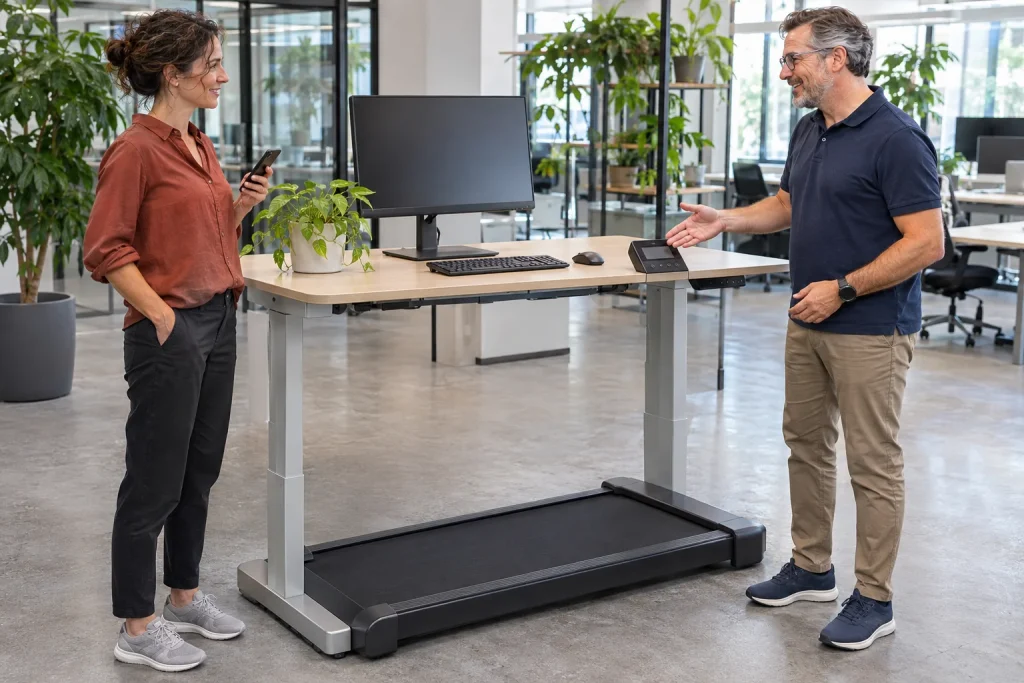
A shared office walking workstation is not chosen in the same way as one person’s home equipment. With the LifeSpan TR5000 Pro+ SC130, handovers, different desk heights and separate personal records matter alongside daily operating time. ‘It lasts through the workday’ is insufficient if nobody knows who used it last, which phone is connected or when it was checked. This guide examines specific features together with how a shared workplace operates.
TR5000 Pro+ and the older TR5000 are not interchangeable names
The current LifeSpan Europe page names a TR5000 Pro+ GlowUp with SC130 console, product code 120104. Older TR5000B or DT3 documents may describe a different version. Identify base and console together. A familiar family name is insufficient to establish which motor, surface, display or warranty conditions belong to the ordered unit.
The current Pro+ page lists a brushless motor with 5.0 HP peak power; the collection page also uses another number when describing the TR5000 family. We do not combine them into a specification valid for every model year. Peak power is not continuous power or the electricity used during a real working day either. If that technical distinction matters to your decision, request written information for the exact version.
The machine is offered for office use, but that does not mean it can go anywhere in any office. Walking surface, full body, desktop and surrounding traffic together form the workstation. Your purchasing list should contain more than a machine name: include the exact package, planned location, desk and who will manage shared use.
Nine hours concerns the machine, not employees
The manufacturer’s current specification gives the Pro+ a nine-hour daily machine-use rating. This is neither a nine-hour personal activity prescription nor an employer performance target. Manage operating limits and maintenance according to the specific instructions; each user’s manageable activity amount is a separate question. Estimate actual combined daily use without assuming every employee has identical needs.
An original fictional booking example: four people each walk twice for 25 minutes. That is 200 minutes, or 3 hours 20 minutes, of actual moving sessions on the machine. Handover and desk adjustment between users add organisational time, not automatically belt operation. An eight-hour office opening period is therefore not eight operating hours. Track the latter when comparing the rating.
Do not try to exploit capacity by requiring someone to use it every free minute. Shared equipment helps when people access it voluntarily, through an understandable process and under appropriate conditions. As a runner, plan your training separately from workday walking; the place of walking in the training week offers further considerations. The nine-hour figure does not answer personal exertion questions.
A shared station needs booking and handover arrangements
First decide how the work surface will be used: designated slots or shorter agreed sessions are options. The essential point is that handover should not occur beside a moving belt and an open personal app. The next user starts from the stopped state specified in the manual, with orderly surroundings. Do not rely on one person’s memory to maintain the process.
An original practical handover list could include a completed session, resolving the previous phone connection, adjusting the desktop and checking clear surroundings. These are shared-use tasks, not manufacturer button instructions. Learn actual stopping, restarting and adjustment from the package’s documentation. A short list is useful when it clarifies the state rather than replacing the manual.
Everyone needs individual familiarisation with controls, stopping and their intended use on the first occasion. One colleague’s routine does not automatically transfer to the next. A higher operating-time rating does not solve a lack of time to learn the device. A shared workstation’s value lies in accessible, understandable use, not merely theoretical capacity to operate for many hours.
 Enlarge image
Desk height is a new question at every handover
The current Pro+ specification distinguishes walking-surface and side-rail heights. These are different points; assess the user’s actual position relative to the desk while positioned on the walking surface. Overall housing height is not directly your standing level. Shoes and body size also change between users, so one setting fitting the first person is not universal.
Assess desktop adjustment range for the different intended users, but do not interpret a tape-measure result as personal medical suitability. Monitor, keyboard and mouse positions also need arranging. If adjustment takes too long or console access is difficult, change the time between bookings too. Try usability during transitions, not only in an attractively arranged demonstration photograph.
According to the manufacturer’s technical FAQ, SC130 preset buttons have different meanings in height and speed modes. Desk-height memory applies only with a supported desk connection. An arbitrary motorised desk does not become controllable because the console is placed on it. Ask about the exact desk–console pairing before purchase and learn preset buttons together with the correct mode.
Intelli-Step: machine steps, not an employee performance metric
The manufacturer calls built-in step counting Intelli-Step. It may provide useful data for someone whose hands remain at a keyboard and who does not want to rely solely on a wrist device. But a feature name is not clinical accuracy certification. Machine steps, a wrist estimate and an event aggregated in an app can represent different sources or processing.
In shared use, the period to which data belong is particularly important. A console total is not self-evidently one colleague’s whole daily movement. Finishing one session and starting the next therefore matter for data too. Step counts cannot establish who worked well, how healthy they are or who completed their day appropriately. The counter was designed for another task.
In your own walking diary, preserve the machine source and session times. If the same event appears on the watch and phone app, first identify duplication. Distance differences can be investigated further using the guide to differences between machine and watch distance. Automatically choosing the larger figure is not a reliable comparison method.
Intelli-Guard: a feature to learn, not general protection
Intelli-Guard is the manufacturer’s operating-monitoring feature, described as stopping in relation to an absence of active walking. Do not translate this into a guarantee that every fall, loss of balance or unexpected event is prevented. Learn its operation from the exact version’s manual. It does not replace attention during use, appropriate surroundings or documented stopping.
The console’s safety key and other controls are separate elements. Every user should know what belongs to their machine and how to apply it according to instructions. Do not copy another model’s settings for a sensing or communication problem. In particular, do not disable a function because an old online comment promises faster use. Describe the precise problem and use support as the next step.
Other people moving through shared space are part of the environment too. The passage behind the belt, cable and colleague pulling out a chair do not appear in the step count, but matter to placement. Consider manual clearances alongside actual office traffic. Do not use quietness or automation as justification for omitting required space.
SC130 synchronisation with several people: phones are part of handover too
The SC130 product page lists Bluetooth and LifeSpan Fit records. This does not automatically establish that the console recognises employees by name, offers NFC sign-in or allocates sessions to the correct accounts independently. If you need that capability, request evidence for the particular version. A general synchronisation promise does not replace a process fully tried in a shared environment.
As an original acceptance trial, two volunteers could each create a short completed session. Before the second, resolve connection and session state in the documented way. Afterwards, each checks their own phone for their own event. Do not conceal an unclear handover process with shared passwords and a shared personal diary. Successful first pairing is not a multi-user trial.
The publisher’s LifeSpan Fit description also mentions summary synchronisation to Apple Health with permission. Each person should understand which data moves onwards, with what source and where it can be reviewed. Booking a workstation does not require seeing each other’s personal health platforms. The equipment owner manages operating arrangements; separate personal records according to actually supported services and individual choices.
 Enlarge image
Warranty and maintenance: shared offices are a different use
LifeSpan’s European warranty page separates home single-user and business multi-user categories. ‘Lifetime warranty’ therefore should not automatically be extended to every part of shared office equipment. Confirm written terms for the order and intended setting with the seller. This article does not assess them legally; it identifies the distinction as part of procurement.
Track operating hours and maintenance systematically. If four people use one machine, no individual’s fitness diary fully captures combined use. Assign responsibility for documentation, periodic checks and support. Lubricant, frequency and adjustments prescribed for that version take precedence; do not automatically transfer an older TR5000B document to the new Pro+ base.
Fault reporting needs a route too. A short operational note about the issue, time and whether the device has been taken out of use pending clarification may help. This is not a servicing record or permission to open the housing. A slipping or malfunctioning machine should not be left to the next user in the hope they choose another speed.
Acceptance should involve more than switching it on
Meaningful office acceptance includes the exact model, suitable placement, a desktop adjustable for several people, controls and separate records. Assess quietness with real calls and the shared space; we claim no original noise measurements for this model. A manufacturer’s decibel figure or quiet-operation advertisement does not establish what a neighbouring desk or online meeting participant hears.
Assess usage data alongside booking experience. If the machine is suitable but handover repeatedly stalls because of desk or phone issues, improve the process. If the station is comfortable only at one person’s setting, shareability is not established. A nine-hour rating resolves neither problem; the whole office process needs to work.
The TR5000 Pro+ SC130 is a strong shared-workplace candidate when it fits actual combined use, package conditions are clear and handovers work in practice. Step counting and Bluetooth records may help, but the machine still needs an owner, space and understandable arrangements. Well-organised sharing is not an extra console button; it is operation designed jointly around equipment and office.
Sources and verification
Checked on 21 November 2026. The package examined is the LifeSpan Europe TR5000 Pro+ GlowUp SC130, 120104. Booking and handover examples are original organisational illustrations, not manufacturer certifications or physical device-test results.
- LifeSpan TR5000 Pro+ SC130 European product page
- Manufacturer’s model comparison and daily machine ratings
- LifeSpan technical FAQ: console and preset modes
- Official LifeSpan Fit app page
- LifeSpan Fit publisher’s own description
- LifeSpan: home and business warranty categories
- LifeSpan manual selector
How Futószív articles are prepared: our editorial guidelines.