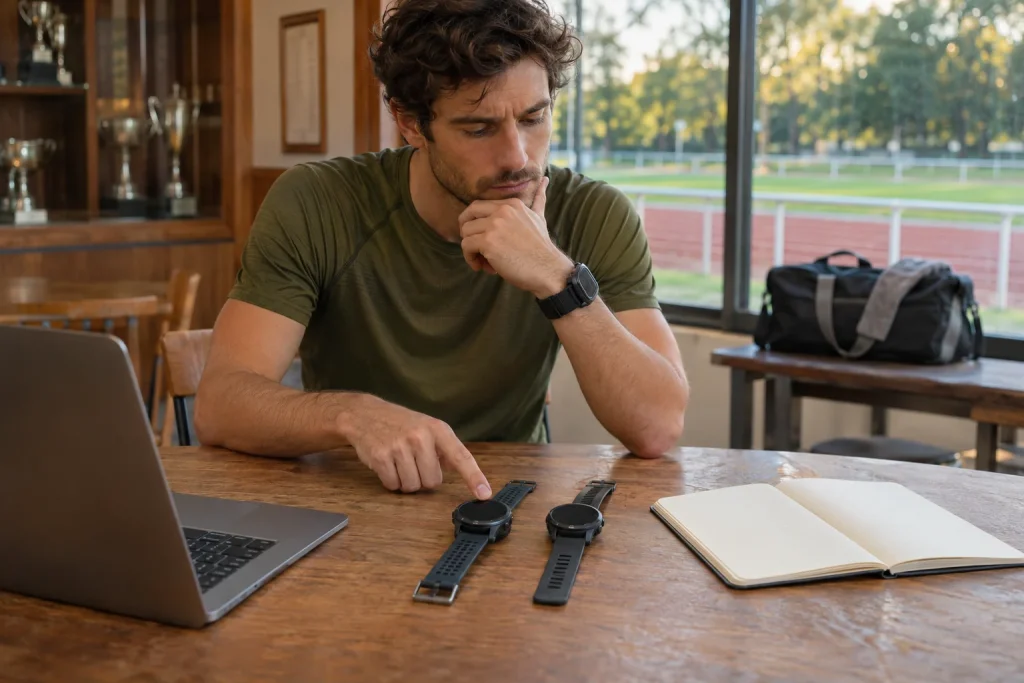
One completed run, two different digital records
You are comparing a new watch with your old one, so start the same run on both. At the end, one reports 8.02 kilometres and the other 8.09, creating two log entries. Technically, two recordings exist, but your body completed the route once. Preserve this distinction in the archive: you can keep two data series for measurement comparison without counting two workouts in your training volume.
“Duplication” can describe several situations. The same file may be uploaded twice, one source may arrive through two synchronisation routes, or two independent files may record the same movement. The latter can differ in start time, sensors and available fields. Checking complete file identity and finding entries referring to the same real event are therefore separate tasks.
The method below does not describe a service’s hidden duplicate filter. It provides an order of checks for organising your archive while avoiding hasty, irreversible deletion. The aim is a traceable main workout entry and, where needed, a preserved comparison recording. You need not erase the fact that two devices measured the same situation differently; prevent two measurements from appearing as two completed loads.
What distinguishes the two recordings?
The FIT Activity format description separates summaries, laps, timestamped records and events within an activity. A file therefore stores more than the final kilometre total. The Garmin decoding guide also shows device information that may include manufacturer, device type, serial number or software version. Availability depends on the actual file; missing fields do not independently establish identity with another recording.
When comparing files, source device, recording start and end, and timestamped series are useful together. Both being called “morning run” is weak evidence. Identical total distances are not decisive either, since rounding can hide differences. Conversely, different distances do not disprove a shared event: two GNSS recordings or calculation methods can summarise the same journey differently.
A cryptographic checksum can help establish byte-level identity: matching SHA-256 values provide a strong identity check. Repackaging, conversion or a metadata change can produce a different hash while the content still concerns the same workout. Different hashes therefore establish only that the file bytes differ. They do not prove separate runs or independently justify counting both entries.
 Enlarge image
Look at a time window rather than one starting second
You start one watch at 7:00:02 and the other at 7:00:11. Nine seconds is enough for different start times even though most of the movement is shared. When organising your archive, examine overlap between time intervals too. An exact start-time match can identify candidates, but is not the only way to find entries referring to the same event.
Do not invent details of automatic filtering. The Strava Apple Health support information, for example, suggests looking for an entry with the same date and time when investigating possible duplication. This does not disclose every internal filtering rule or guarantee recognition of every two-watch recording. The system accepting two uploads still leaves you to decide whether they represent the same completed activity.
If time-zone changes, travel or an incorrect device clock are involved, clarify the meaning of timestamps rather than relying on displayed local time. Do not arbitrarily edit a date just to bring entries together. An organising table can separately record original time, time shown in the app and your note. Later checks can then distinguish a recording difference from one introduced in display.
Sensor origin matters even with similar traces
Two watches can show the heart-rate series from the same chest strap. Matching traces may then be two receiving copies of one source rather than confirmation from two independent heart-rate measurements. The same can happen with a shared foot sensor or another external source. In a comparison archive, the recording watch and actual sensor therefore provide separate information. Changing the device does not guarantee independent measurement.
One series may have more complete heart-rate data, the other a more complete route. Do not reduce this to “longer is better”. Check for unnecessary sections before starting or after finishing, signal gaps, incorrect pauses or other known recording circumstances. Selecting the main entry is transparent when you can explain why it became the version counted in your training log.
If keeping both originals for experimental comparison, label their roles and sources: main workout recording and comparison watch recording. Exact labels depend on your system, but do not leave their meaning to future memory. A year later, why you apparently ran the same route twice in the same minute may be less obvious. The archive should preserve that explanation alongside the data.
Calculate what double-counting distorts
In our numerical example, four actual weekly runs cover 6, 8, 10 and 12 kilometres, totalling 36. If the second watch’s version of the eight-kilometre run enters the same table as 8.1 kilometres, the weekly total becomes 44.1. The extra is 8.1 divided by 36, or 22.5 per cent. The runner ran no farther; only the accounting unit became wrong.
The same can happen with time. If both versions of a forty-eight-minute run count towards the week, forty-eight non-existent additional training minutes appear. The weekly bar chart can suggest an increase in load. Later averages or goals calculated from that series can carry the error into subsequent decisions. Duplication is therefore more than an aesthetic inconvenience in a feed.
Do not automatically assume every service adds duplicate training-load scores in the same way. In your own exported table or log, however, you can check exactly which rows enter the total. If two versions contribute 70 and 75 points, the sum of 145 is not a new physiological measurement. Establish that the entries represent the same event before investigating differences in score calculation.
Save the original file before deleting
The Strava September export guide describes several export formats and generally recommends downloading the original version. Export Original returns the format originally uploaded, often FIT. A newly generated GPX is not automatically a copy preserving every original field. Format choice can matter if sensor data, events or device origin need checking later.
Save both original recordings separately with clear filenames containing date and source. Do not overwrite raw copies with later edited versions. A comparison table can include filenames and the reason for your choice. This need not be a complex IT project: two clearly named originals and a few lines of notes provide a far better recovery basis than a file whose watch of origin you cannot identify.
Content on a social platform may not be rebuilt by re-uploading a file. Comments, photographs and other associated elements differ from the workout time series. Before deleting, check which entry contains additions important to you. Saving the whole user experience must not be confused with exporting a measurement file. If deletion consequences are unclear, consult the service’s current description first.
 Enlarge image
Do not automatically join two watches’ recordings end to end
Combining consecutive parts of a session differs from handling fully overlapping recordings. If both watches recorded the same forty-eight minutes, concatenating their files does not restore a continuous ninety-six-minute run. It repeats the same period. An external tool labelled “merge” or “combine” does not itself explain how overlapping records are handled.
It is different if one watch ran out of battery and another recorded only from that point. Understand the connection from actual times and remaining data. Do not fill missing sections with invented points or arbitrary time shifts to make the map prettier. An honestly documented partial recording is often more valuable than a retrospectively seamless series of uncertain origin.
After selecting the main version, check where each linked service receives data. If one app forwards from a watch account while another also forwards from a health platform, the same measurement can arrive through multiple routes. The solution is not necessarily disabling every connection, but understanding each route’s role. A new recording in a low-stakes personal trial can check whether the simplified chain creates only the desired entry.
Preserve the evidence and clean up the totals
The current Strava leaderboard rule does not allow two public versions of the same activity; for duplicate uploads it asks that one be set to Only You. This is a social-display rule. It does not prove that making a version private automatically removes it from every personal statistics table. Visibility and inclusion in training volume need separate checks.
After organising, review weekly distance, time and your summaries again. A good check goes beyond one row disappearing from a feed. Confirm that the completed event is counted once while originals needed for measurement comparison remain. If several apps feed a weekly report, the time for a change to appear and the source of the stored total may differ in each.
A brief closing note might say: “I recorded the same run with two watches; I count recording A in the main log and kept B’s original file separately for comparison.” Different distances and the existence of two files then remain understandable. An archive serves well when it distinguishes the completed run from its measurement versions. Extra technical data supports comparison rather than inventing training volume.
Sources
- Garmin: FIT Activity
- Garmin: FIT decoding
- Strava: original and bulk export
- Strava: Apple Health and duplication
- Strava: leaderboards and duplicate activities
How Futószív articles are prepared: our editorial guidelines.