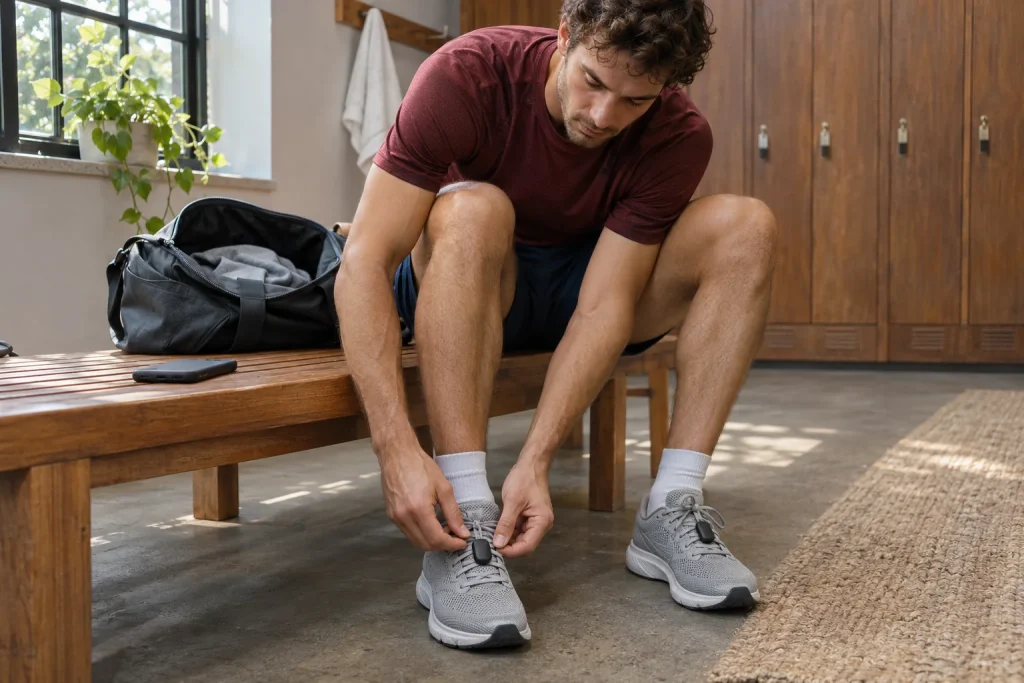
A sensor clipped to a shoe becomes a useful training tool when you ask an understandable question of its data. Was effort consistent on the long climb? Did two similar wattage readings mean the same thing? Did the planned intervals reach the watch? In Stryd’s system, foot-worn hardware, the mobile app, the watch and browser-based PowerCenter answer together. Learn their roles separately: a working Bluetooth connection does not mean every analysis is available.
This guide interprets manufacturer documentation checked on 21 November 2026 without claiming an independent device test. A short data path is the most useful starting point: what did the sensor measure, what did the watch record, what synced to the app and which interface displays the result? Following that path lets you decide about membership or a second sensor from a specific need.
From shoe to PowerCenter: four separate roles
The setup guide says to create an account and pair the pod in the mobile app first, then configure the appropriate watch connection. The phone’s Stryd app also handles firmware updates and must remain open during updating. Secure positioning that stays consistent between shoes matters for attachment. The manufacturer illustrates a clip threaded under four lace strands, or five where appropriate. Follow this specific fitting guidance for your own lacing. Initial pairing and attachment in Stryd’s guide.
Imagine loosely hooking the device onto the top lace of a new shoe two minutes before setting off, then comparing the result with a run recorded in an older pair. Attachment has changed along with the shoe. In an analysis log, record clip position alongside “new shoes”. The aim is knowing what you are comparing; an attractive graph does not preserve that circumstance by itself.
Phone pairing, the watch’s run file and separate sensor synchronisation can be listed as adjacent checkpoints. If the watch had speed data but a detailed PowerCenter view is missing, first locate the relevant section of the data path. Deleting the entire account or reimporting every previous run is too large an intervention for a problem not yet identified.
What remains without membership, and what are you paying for?
The current Membership feature table also lists Critical Power and its history, post-run data, tagging, the Power Duration Curve, Race Power Calculator and workout syncing from external platforms for basic users. Paid features include Workout Builder and Library, Adaptive Training, automated post-run explanations and Footpath. Stryd hardware can therefore be used without a separate membership; assess additional services against the specific task. The manufacturer’s comparison of basic and membership features.
If an external coach already prepares power-based workouts, convenient execution and a file you can review may matter most. If you want to build your own workout library and use an adaptive plan, your package requirements differ. Make two short lists: functions actually used in the last month and functions you merely hope to try someday. The former shows existing value; the latter belongs to a future decision.
One missing menu item does not automatically mean new hardware is needed. Entitlement, software version and synchronisation are separate requirements. Equally, buying a second pod does not unlock every subscription view. Keep hardware and recurring services on separate lines when planning costs.
Critical Power is a model’s reference point
Stryd uses Critical Power, or CP, as the basis for power zones and targets. The manufacturer defines it as an estimate and describes several ways to establish it: an initial estimation workout, a value calculated from varied running data and manual entry based on an appropriate history. It also specifically warns against treating a threshold from another running or cycling power meter as an unchanged Stryd value. Establishing CP and the role of data sources.
In our illustrative calculation, a CP of 250 watts gives an eighty per cent target of 200 watts. If the model later updates to 260 watts, the same relative target becomes 208 watts. The eight-watt difference then comes from a changed reference. It does not prove that your body changed by that much overnight or that every previously comfortable run should become harder.
Read data alongside its date: which CP applied when the workout was planned and which when it was evaluated? This is particularly useful after a long break, device change or unusually one-sided dataset. Understanding test instructions is not an automatic reason to attempt maximal tests; first decide which training you are prepared for and which question needs a new reference.
 Enlarge image
Adaptive Training: organising the calendar around watts
The 2026 Adaptive Training guide says the plan adapts to the goal, recent training and specified time allowance. Another active plan must be paused before starting. The system also uses changes in CP and post-run effort feedback; the weekly pattern of days can be adjusted at phase transitions. “Peak Weekly Duration” means the cycle’s highest weekly running duration, rather than a compulsory amount for every week. How Adaptive Training works.
If you can run at most four hours in a week, for example, first clarify whether that is a sustainable upper allowance or one unusually free week. Entering the same number for both may produce a misleading plan. Four hours over four days would average sixty minutes, but does not mean every workout lasts an hour: distributing short and long days is a separate planning question.
Alongside calendar availability, consider travel, access to the training location and free time after a long workout. Tuesday’s intervals might fit into forty-five minutes yet still not fit your day if reaching a suitable location takes another half-hour. This everyday detail determines the practical value of the honest time allowance supplied to an adaptive plan.
A main race and a supporting event are different tasks
The separate Event A guide organises the adaptive cycle around one active main race. Adding a more distant A event may rearrange the entire timeline, while a B event prompts smaller local adjustments. The system supports race-specific organisation up to twenty-four weeks ahead; for a more distant goal, it switches later from maintenance mode. These are software-planning parameters, rather than certificates of readiness to complete the distance entered. Handling Events A and B in an adaptive plan.
Consider an autumn half marathon and a relay with friends three weeks earlier. If you intend to race every relay leg all-out, it may not function as a simple supporting event in your life even if labelled that way in the calendar. Match the category to its real role. The plan and your expectations then refer to the same event.
Stryd Assistant’s separate support page says suggestions are available through notifications, covering CP calibration options, phase-transition previews, pausing and returning. An important interface detail is that the conversation’s back button does not reverse changes already made to the calendar or data. Reading the change summary before modifying anything is a useful habit. Assistant suggestions and the limits of going back.
Watch-displayed watts, a data field and a full workout app
On Garmin, add the Stryd Zones data field to a screen in the appropriate running profile; installing it from Connect IQ is not enough. On supported models, Running Dynamics Pod pairing enables additional second-by-second metrics; the appropriate footpod connection still has a separate role for pace and distance. On Apple Watch, after pairing in Stryd’s mobile app, start the workout from Stryd’s watch app. Check support for your actual watch model separately. Configuring Stryd’s watch data paths.
Three questions avoid most conceptual confusion: can you see the current reading, is it included in the saved run, and can the watch interface execute the plan’s steps? Displayed wattage answers the first. A detailed data series answers the second. Feedback marking an interval’s start answers the third. All three can be checked separately on a short trial run.
Do not make that first trial in a race starting area. In a calm, short test, record a section, save it and inspect the same run on the phone and in the browser. If a field is missing, note the watch, profile and app names. This describes the problem far more precisely than “Stryd does not work”.
Footpath: single-sided observation and genuine bilateral data
Manufacturer documentation is not entirely consistent here. The Duo FAQ lists two same-generation pods and membership as Footpath requirements. The separate Footpath guide explicitly describes single-sided use too: one Stryd 5.0 or Next Gen, active membership, an updated app and firmware 2.1.31.19 or later as specified there. Bilateral comparison still requires two suitable pods; Next Gen and 5.0 cannot be mixed into a Duo pair. Detailed single-sided Footpath guide; the differently worded general FAQ.
A trajectory from one foot does not reveal the other foot’s movement. Moving a sensor to the other shoe on a different day does not produce a bilateral measurement pair from the same run either. This is a simple comparison rule: time, pace, surface and fatigue may also have changed. The data can still be valuable for personal observation, but answers a different question.
Link the trajectory to one selected section. For example, compare the beginning and end of the same level loop, noting shoes, speed and subjective sensations alongside it. The graphic alone neither diagnoses injury nor specifies “correct” foot movement. Do not immediately plan a technique overhaul from a striking difference; first look for differing circumstances.
Missing Impact Loading Rate: which file are you looking in?
Support information dated 23 July 2026 lists several supported recording paths for Impact Loading Rate, including the appropriate Garmin field or app, Apple Watch’s Stryd app and phone/offline syncing. It specifically says direct COROS recording is not yet supported, while an offline path merged after a COROS run is among the options. The required hardware and firmware are conditions too. A missing watch field and sensor data that can be added later are therefore different situations. Impact Loading Rate and recording compatibility.
For troubleshooting, make a small table: run date, recording device, app used, watch data and separate sensor-sync status. If only the watch app differs between two rows, there is already a specific difference to investigate. If you also changed pod, watch and shoes, separate those changes first. This is a data-handling method, rather than a judgement of running form.
 Enlarge image
An external coach’s plan and Stryd’s calendar
The traditional plan-management guide requires structured workouts containing power targets for TrainingPeaks and Final Surge connections. Plain written instructions are not the same as an importable sequence of steps. The guide says external platforms are checked for changes twice daily; a change immediately before setting off may require manual workout syncing. This is a separate data path from uploading a completed run. Importing external structured workouts.
Our own example: eight minutes warming up, three four-minute work intervals with two easy minutes, then six minutes cooling down. Retaining the easy two minutes after the third work interval gives a total of 32 minutes; omitting it gives 30. The same written workout can be constructed in two ways. Read the step order and total duration before starting, rather than only the workout title.
Before buying membership: date, country and billing channel
The 2025 price-update FAQ’s EU table shows EUR 13.99 monthly, EUR 45 for four months and EUR 120 annually. Its fifteen per cent hardware discount for existing users has a 17 November 2025 deadline, so cannot be treated as a current offer. Current country and package details shown in your account govern the purchase. Our calculation gives EUR 167.88 for twelve monthly payments at the table’s rate; this is a comparison, not a promise of today’s Hungarian checkout price. Price table and the old promotion’s date.
The January Membership description says app-store subscriptions must be managed where purchased; a PowerCenter package can be managed separately. Membership cannot be paused, and cancelling a committed period taken with hardware does not end the agreed payments early. Both the membership feature table and payment conditions therefore matter. Membership management and the committed period.
For the decision, define one next task: building your own workout, analysing detailed foot trajectories or sending an existing plan to the watch? Then check its required hardware, app, watch solution and membership. Stryd becomes an understandable workflow: attachment, recording, syncing, interpretation and a small, justifiable next decision.
Sources
- Getting started with a single Stryd sensor
- Stryd 5.0 and membership price changes
- Stryd Membership and feature table
- Establishing Critical Power
- Stryd Adaptive Training guide
- Adaptive Training and Event A
- Stryd Assistant
- Configuring Stryd and watches
- Single-sided and bilateral Footpath
- Duo and Footpath FAQ
- Recording Impact Loading Rate
- Traditional plans and external workout imports
How Futószív articles are prepared: our editorial guidelines.